
Cafe Accounts Tracker
Know what you earned. See what is still due.
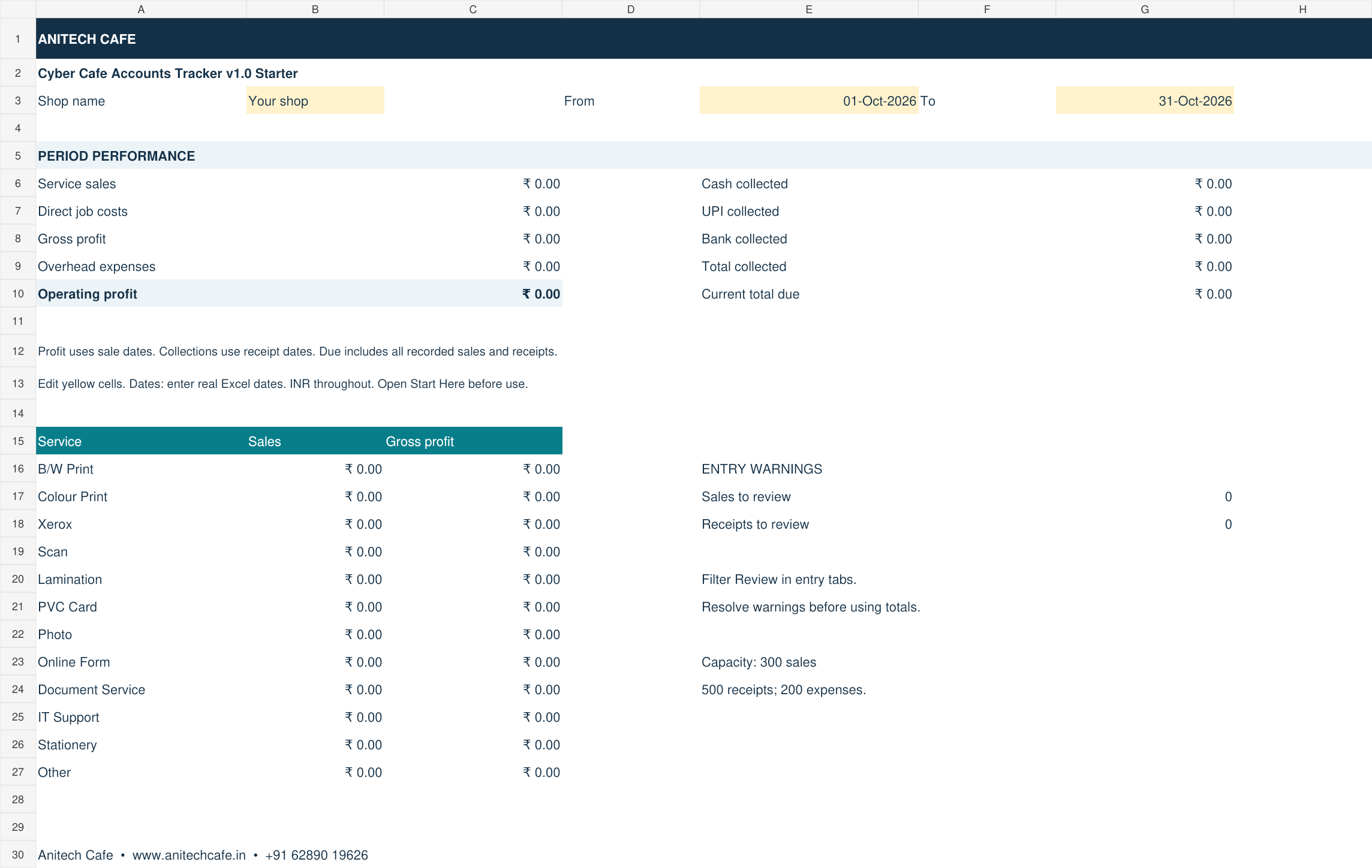
Record service sales, Cash / UPI / Bank receipts and expenses in one practical Excel workbook. Review collections, operating profit and customer dues.
For cyber cafes & small service shops
- Sales, expenses & profit overview
- Customer dues & partial payments
- Bengali + English instructions · No macros
Before you get started
Microsoft Excel desktop 2016 or later intended. Excel software is not included. Other spreadsheet apps have not been verified.
Five useful sheets. One clear workflow.
| Sheet | Purpose |
|---|---|
| Overview | Choose dates; view sales, costs, operating profit, receipts and current dues. |
| Sales | Record service, quantity, rate, direct job cost and a unique Sale ID. |
| Collections | Record each payment against its Sale ID, including later or split payments. |
| Expenses | Record rent, salary, internet, electricity and other overheads. |
| Start Here | Bengali and English guidance, a worked example and licence terms. |
Enter. Collect. Review.
- Save a working copy. Change the shop name and reporting dates.
- Enter jobs in the yellow input cells. Add payments in Collections and overheads in Expenses.
- Review the Overview sheet. Filter Sales for outstanding dues or entries needing review.
Operating profit = recorded service sales − direct job costs − overhead expenses. Current dues include all recorded dates and are not historical dues as at the selected end date.
Before you buy
Capacity and software
Each workbook has 300 sale entries, 500 receipt entries and 200 expense entries. Use another copy for the next reporting period. Old dues and later receipts stay in the original file; there is no automatic consolidation. Designed for Microsoft Excel desktop 2016 or later. No macros or installation. Other spreadsheet software has not been verified.
What is outside this edition?
No GST invoicing, tax calculation, inventory, opening balances, refunds, bank reconciliation or live data synchronisation. This is a sales-and-expense tracker. Back up the file regularly. Formula cells are editable, so change only the yellow input cells.
Licence and support
One purchased copy may be used by one business and its staff. You may keep backup and working copies for that business. Do not resell, redistribute or publish the template. For file-access or usage questions, contact Anitech Cafe on +91 62890 19626.
Payment and delivery
When can I download?
When online checkout is available, download unlocks only after Razorpay payment verification and capture. Save the Excel file to your computer. A verified purchase can be downloaded again from the same browser tab for up to seven days, subject to payment remaining valid. No automatic email delivery is included.
Payment deducted, but no download?
Use Retry payment verification in the same browser. Do not pay again. Keep the payment reference and contact us on WhatsApp if your session was closed or the problem continues. We can check the payment and help with delivery.
WhatsApp orders and problems with a file
WhatsApp opens a conversation; it does not take payment or automatically deliver a file. Confirm payment and delivery with the shop. For a duplicate charge, missing download or materially defective file, contact us with the payment reference and problem details so we can review delivery, replacement or refund. These product details supplement our Terms, Refund Policy and Privacy Policy.
Seller: Anitech Cafe, 20/11 Baguiati Road, Kolkata-700028. Contact: +91 62890 19626.